
The Lockbet mobile application brings the complete betting and casino experience to your smartphone. Built specifically for Kenyan users, the app handles M-Pesa transactions, live betting markets, and casino games in a lightweight package that works on 3G networks. Download takes under two minutes and the interface is optimised for devices with limited storage—you're looking at roughly 15MB installed.
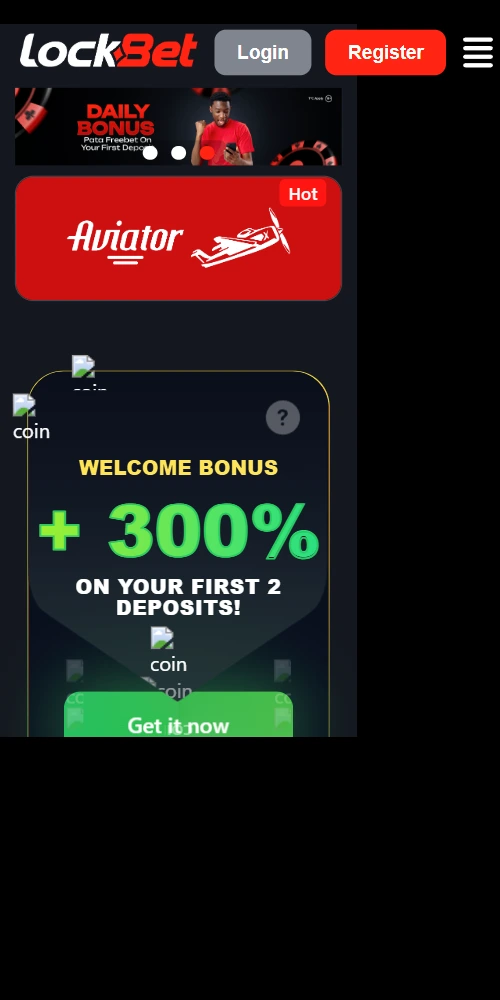
Mobile betting accounts for the majority of transactions on the platform, which makes sense given how Kenyans interact with online services. The app version offers specific advantages over the mobile browser site; mainly around speed, data consumption, and offline functionality that matters when you're dealing with inconsistent network coverage in certain areas.
Push notifications keep you updated on bet outcomes, bonus offers, and withdrawal confirmations without needing to open the app constantly. The offline bet slip feature is genuinely useful—you can queue up your selections when connectivity drops (common on matatus or in buildings with poor signal), and they'll submit automatically once you're back online. Biometric login on compatible devices cuts down the friction of entering passwords every session.
Data usage is optimised compared to loading the full mobile site repeatedly; the app caches interface elements locally so you're only pulling fresh odds and game data. On a typical day of casual betting and slot play you might use 20-30MB versus 50-60MB on browser. Not huge savings but it adds up if you're managing a tight data bundle.
Android installation requires enabling unknown sources since the app isn't distributed through Google Play—this is standard for betting apps in Kenya due to Play Store restrictions. The process takes 3-4 minutes if you follow the steps properly.
Open your mobile browser and navigate to the Lockbet website. Look for the "Download Android App" button, usually visible on the homepage or in the mobile menu. Tap that and the APK file starts downloading—you'll see a notification in your status bar. File size is approximately 12-15MB so it won't take long on 4G, maybe a minute or two on 3G.
Once downloaded, your phone probably throws up a security warning about installing from unknown sources. Go to Settings > Security > Unknown Sources and enable it (on newer Android versions it's Settings > Apps > Special Access > Install Unknown Apps, then select your browser). Now open the downloaded APK from your notifications or file manager. Tap "Install" and wait 30-40 seconds for the installation to complete.
After installation you can disable unknown sources again if you want. Launch the app, log in with your existing credentials (or register a new account directly in the app), and you're set. The app requests permissions for notifications and file access—allow these for full functionality, though you can deny them if privacy concerns outweigh convenience.
The iOS version isn't available through the App Store for similar regulatory reasons as Android. Lockbet provides a web app (PWA) for iPhone users that functions nearly identically to a native app but installs through Safari instead of the App Store.
Open Safari on your iPhone—this won't work properly in Chrome or other browsers due to iOS restrictions. Navigate to lockbetkenya.com and tap the Share button (the square with an arrow pointing up) at the bottom of your screen. Scroll down in the share menu and select "Add to Home Screen". Give it a name (or leave it as Lockbet Kenya) and tap "Add".
An icon appears on your home screen that launches the web app in full-screen mode without the Safari interface. It behaves like a native app whereby you get the same features, same speed, same M-Pesa integration. The main limitation versus Android is that iOS doesn't support background notifications as robustly, but you still get in-app alerts when the app is open.
Storage requirements are minimal since it's web-based—maybe 5-8MB of cached data versus the Android APK's 15MB installation. Updates happen automatically when you launch the app, so you don't need to manually download new versions.
Deposit and withdraw via M-Pesa directly in-app, same 100 KES minimum as desktop
In-play markets with real-time odds updates and cashout functionality on mobile
500+ slots, live dealer tables, Aviator—all providers optimised for mobile screens
Bet settlements, bonus offers, withdrawal confirmations sent to your device
Queue selections when offline, auto-submit when connection returns
Fingerprint or Face ID authentication on compatible Android and iOS devices
OS Version: Android 5.0 or higher
Storage: 50MB free space minimum
RAM: 1GB+ recommended
Network: 3G/4G or WiFi
OS Version: iOS 11.0 or later
Browser: Safari required for installation
Storage: 20MB free space
Network: 3G/4G or WiFi
Supported: Most smartphones from 2016 onwards
Tablets: Android tablets and iPads supported
Updates: Automatic for iOS, manual APK for Android
The app is specifically tuned for network conditions in Kenya where 3G is still prevalent outside major urban centers. In Nairobi, Mombasa, Kisumu you'll generally have 4G and the app performs smoothly—odds refresh in under a second, casino games load in 2-3 seconds, M-Pesa transactions process instantly.
On 3G the experience degrades slightly but remains functional. Live betting odds might take 2-3 seconds to update versus real-time on 4G. Slot games still load but you might wait 5-8 seconds for heavier titles from Evolution or Pragmatic Play. Simple games like Aviator handle 3G fine since they're built with lower bandwidth in mind.
The app includes a low-data mode in settings that reduces image quality and limits background data usage—useful if you're near your bundle limit. This mode can cut data consumption by 40-50% with minimal impact on usability for sports betting (casino games with heavy graphics obviously suffer more).
Mobile security follows the same protocols as the desktop platform. All transactions use SSL encryption, M-Pesa integration goes through Safaricom's secure gateway, and your login credentials are never stored in plain text on the device. The app requires re-authentication after 7 days of inactivity or if you clear app data.
Enable two-factor authentication in your account settings for extra protection—this sends an SMS code to your registered number whenever you log in from a new device. Mildly annoying perhaps but critical if your phone gets stolen; whereby the thief can't access your account even if they somehow bypass your phone's lock screen.
Lost your phone? Log into the desktop site immediately and use the "Sign Out All Devices" option in account settings. This kills all active mobile sessions and forces a fresh login with password and 2FA. You should also contact customer support at +254710999944 to temporarily freeze your account until you recover access.
Payment Methods:






Game Providers:








Lockbet is licensed by BCLB under the Betting, Lotteries and Gaming Act, Cap 131, Laws of Kenya under license number: 0001235.
Office Address: P.O. Box 46808 Nairobi | Biashara street, Biashara shopping mall. +254710999944
🔞 18+ only. Gamble responsibly.
© 2025 Lockbet Kenya. All rights reserved.